
TABLE OF CONTENTS
- Disclaimer
- Login with UKG Ultipro Application Password
- Forgot UKG UltiPro Website Username or Password?
- Troubleshooting
- FAQs
- Solutions for HelpDesk Agents Only
- Related Links
Disclaimer
Note: This article only applies to people who are not active HZO employees. All active HZO employees should visit this link instead:
How to login to UKG UltiPro (Single Sign-On)
Login with UKG Ultipro Application Password
Visit https://hzoprotected-dl.ultipro.com/
Enter your website username and password. The username will be your email address on file with UKG UltiPro. You will be logged in to UKG UltiPro website
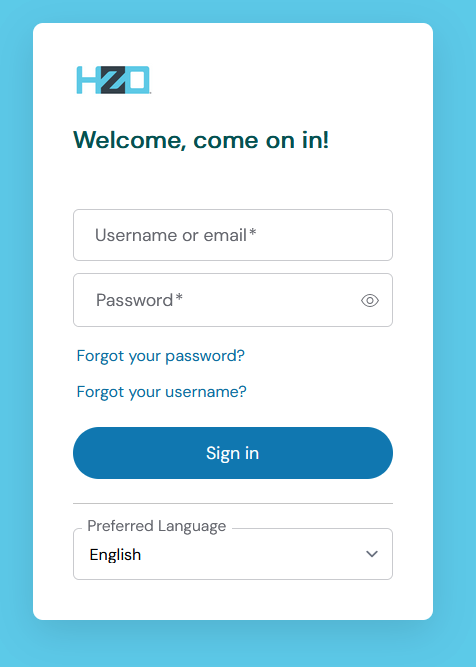
Forgot UKG UltiPro Website Username or Password?
Visit https://hzoprotected-dl.ultipro.com/
(1) Click on "Forgot your password?" link
(2) Enter your email address
(3) Press on "Go" button
Former employees may have an email address different than hzo.com on file
Check your email account for password reset instructions. Sometimes emails go to Junk/Spam mail. Please check there before contacting HZO support.
Troubleshooting
Please contact HZO Helpdesk if you encounter the following errors:
- Error: User name/password combination is incorrect or account is inactive
- Error: There is a problem with your activation. Please try again or contact your administrator.
- Error: Your sign-in is blocked (Microsoft Office 365 SSO login only)
FAQs
Refer to the instructions below for questions
Account Re-Activation / Locked Accounts
If you have locked your account due to too many failed password attempts, you will need to reach out to your System Administrator or the IT team to have your account reactivated.
Global Colleagues in China, Vietnam, and Europe
Due to the time difference, please reach out to the HZO Helpdesk as your first point of contact.
UKG Ultipro System Administrator
Please contact US HR team for assistance.
Solutions for HelpDesk Agents Only
UltiPro Troubleshooting for IT
Related Links
HZO Single Sign-On (SSO) Enabled Applications